Add a page of your own
Pages are for whatever the built-in parts of the site do not cover: your history, a repertoire list, how to hire the choir, a privacy notice. A page is a title and formatted text. It cannot hold pictures, tables or forms.
Only a Site Admin or an Admin can add or change pages. A Manager does not have Pages in the admin panel. See The three kinds of admin.
Add a page
- In the admin panel, open Pages.
- Press New Page at the top right. The New Page form opens.
- Fill it in (see the table below).
- Press Create Page.
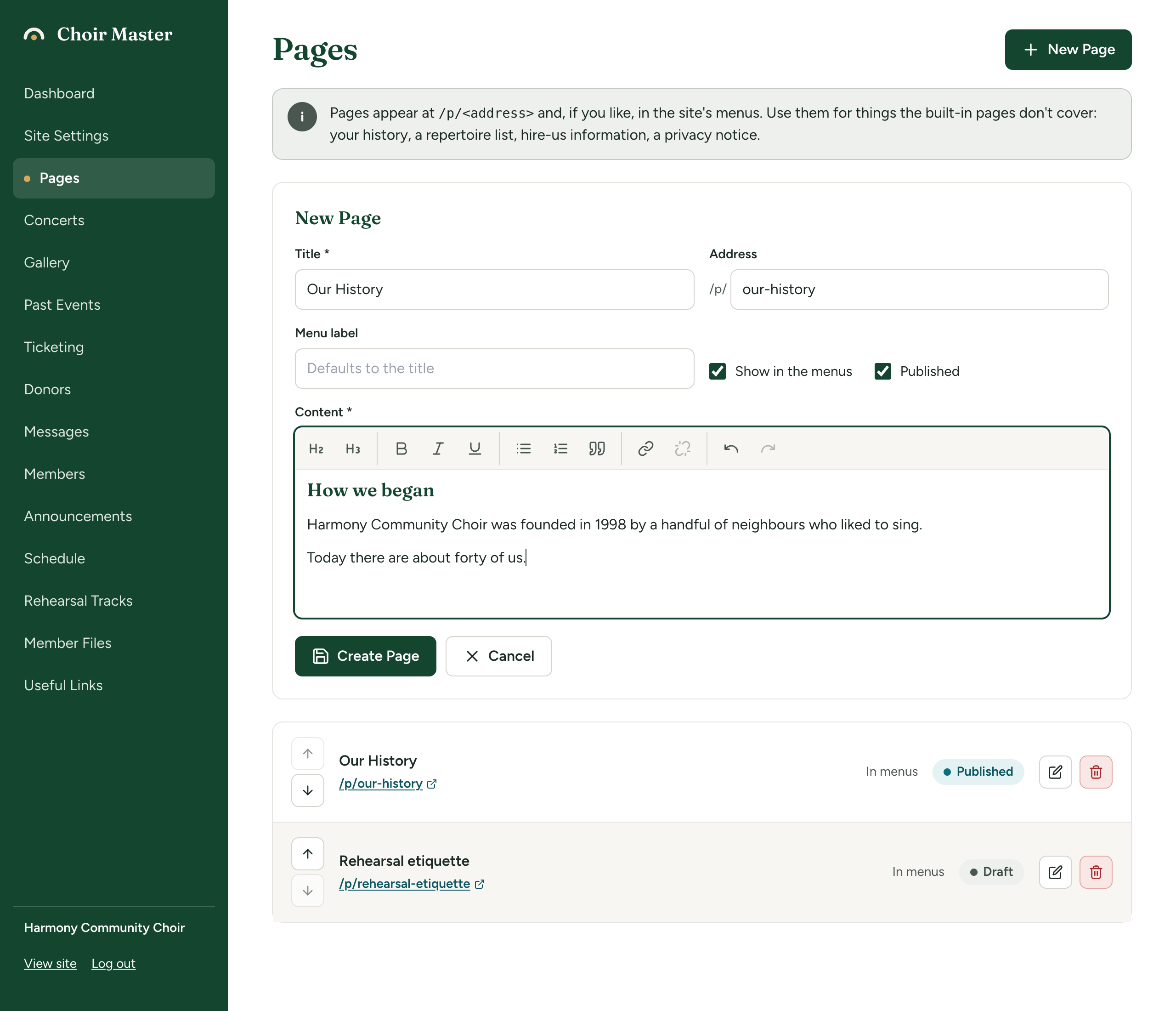
With both boxes ticked, the page is on your site at once, with an item in the top menu and in the footer's Quick Links.
| Box | What to put in it |
|---|---|
| Title (required) | The heading at the top of the page. 120 characters at most. |
| Address | The last part of the page's web address, after /p/. It fills itself in from the title as you type: "Our History" gives our-history, so the page is at https://www.example.org/p/our-history. Change it if you want something shorter. |
| Menu label | The words for this page in the menus. Leave it empty to use the title. Up to 40 characters; anything longer is cut off. A short label keeps the top menu on one line. |
| Show in the menus | Ticked to begin with. Untick it for a page people only reach from a link. |
| Published | Ticked to begin with. Untick it to keep the page as a draft that visitors cannot open. |
| Content (required) | The text of the page. See Format text with the editor. |
What the two tick boxes are for, and how to put pages in order, is in Drafts, menus and the order of your pages.
Rules for the address
- Small letters, digits and hyphens only. Capitals are made small, and spaces, accents and punctuation become hyphens, so "Hire us!" is saved as
hire-us. What you see after saving is the address that works. - 80 characters at most.
- Two pages cannot have the same address.
- Once you have typed in the Address box yourself, it stops following the title.
- These addresses belong to the site itself and are refused:
admin,member,api,files,tickets,donate,auditions,gallery,past-events,past-directors,resources,login,unsubscribe.
If you change a page's address later, the old address stops working: anyone following an old link, a bookmark or a search result lands on your home page. Choose the address with care, and after changing one, update any buttons or links of your own that point to it.
What visitors see
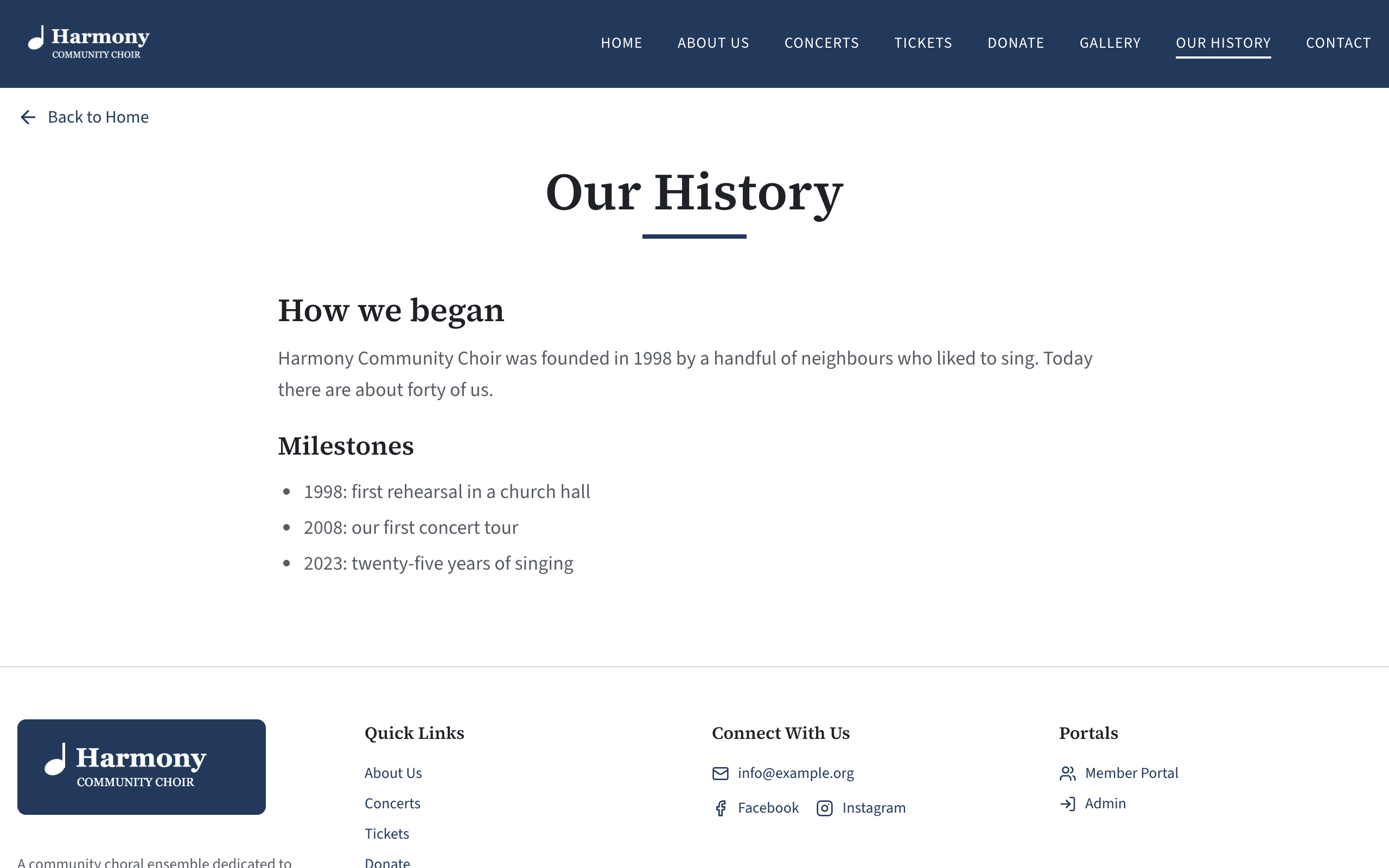
The page has your site's top menu and footer, a Back to Home link, the title as its heading, and your text in a single column that is comfortable to read. Its item in the top menu comes after Gallery and before Contact.
Change a page
- In Pages, press the pencil on the page's row. The Edit Page form opens at the top.
- Change what you need.
- Press Save Changes, or Cancel to leave the page as it was.
The change is on your site as soon as you save.
If something goes wrong
These messages appear in red at the top of the form. Nothing is saved until the form is accepted, so stay on the page and correct it.
| Message | What to do |
|---|---|
| A title is required | Fill in Title. |
| The title is too long | Shorten it to 120 characters or fewer. |
| The address needs some letters or digits | The Address and the title contain nothing that can be used in a web address (for example, a title entirely in emoji or non-Latin script). Type an address in plain letters. |
| "gallery" is used by the site itself; choose another address | The address is one of the reserved ones listed above. Choose a different one, such as photo-gallery. |
| A page with that address already exists | Another page has this address. Change one of them. |
| The page needs some text | Content is empty. Type something. |
| The page is too long | The content is over 200,000 characters, formatting included. Split it into two pages. |
| Could not save the page, Error creating the page or Error saving the page | Try again in a moment. Your text is still in the form. |
| Page not found | The page was deleted by another admin while you were editing it. Copy your text somewhere safe, reload, and add it as a new page. |