Your Donate page
The Donate page is the page on your public site that tells visitors why and how to support your choir. It works on every plan and every kind of site, and it does not need donor records. Use this page to write what it says.
Taking gifts by card on the page itself is a separate feature: see Take gifts by card on your Donate page.
Show the page
The page is in your site's menu while Donate page is on in Site Settings → Features. See Switch pages and features on or off.
Change what the page says
- In the admin panel, open Site Settings.
- Choose Donate page in the list of sections.
- Change the fields below.
- Press Save. The change is on your site at once.
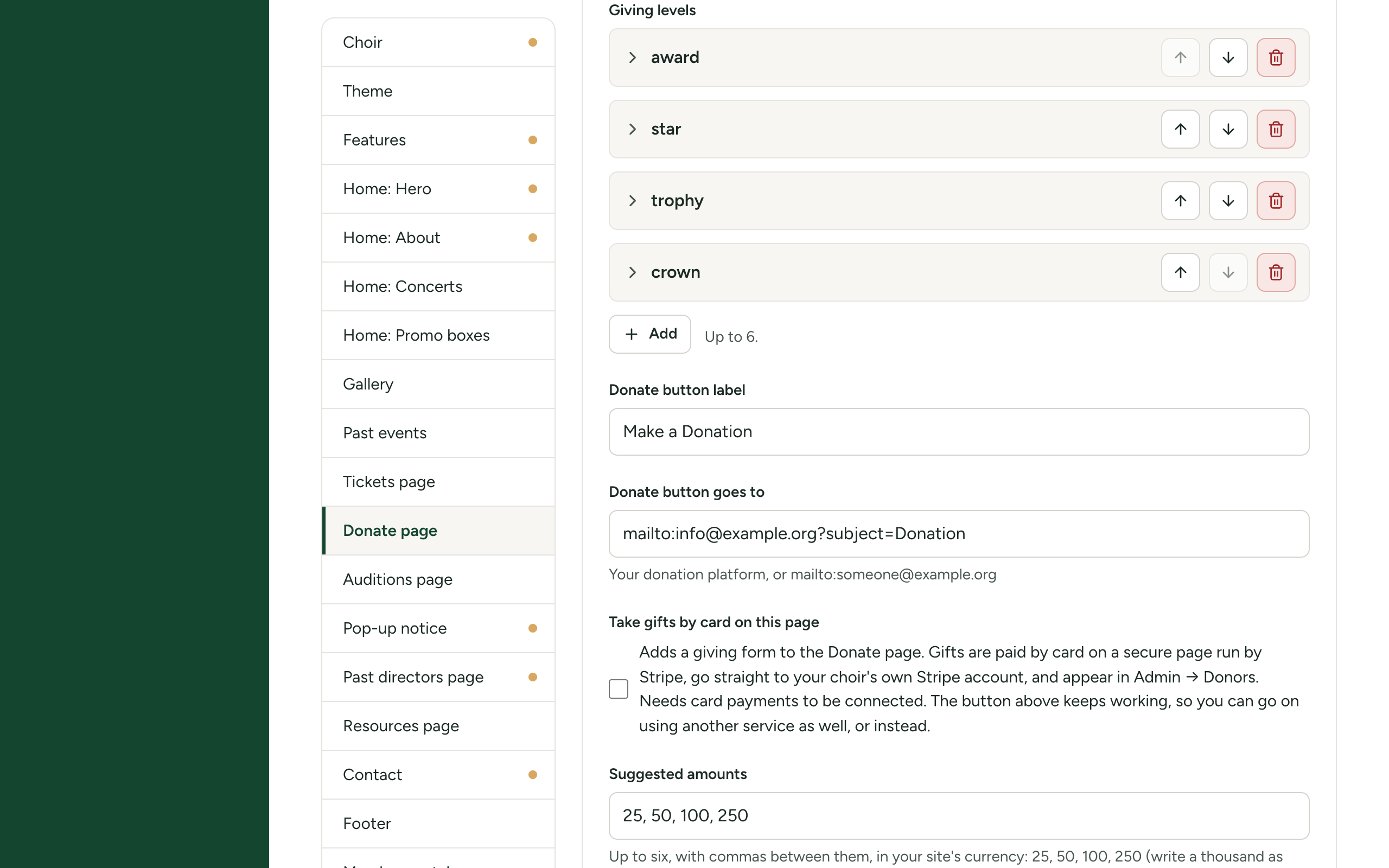
| Field | What it does | To begin with |
|---|---|---|
| Heading | The title at the top of the page. | "Donate" |
| Introduction | A short welcome under the heading, up to 600 characters. | A thank-you to donors |
| Donation box heading | The heading of the large coloured box. Up to 80 characters. | "Support the Choir" |
| Donation box text | A few sentences inside the box, up to 600 characters. | A short paragraph |
| Giving levels | Up to six boxes inside the donation box, one for each level of support. See below. | Friend, Supporter, Patron, Benefactor |
| Donate button label | The words on the button. Up to 60 characters. | "Make a Donation" |
| Donate button goes to | Where the button leads. See below. | A mailto: address |
| "Why support us" heading | The heading of the box of reasons. | "Why Support Us?" |
| "Why support us" points | One reason on each line, up to eight. | Five sample reasons |
| Tax and receipts heading | The heading of the box about receipts. | "Tax Receipts" |
| Tax and receipts text | Formatted text about your charitable status and receipt policy. | A reminder to replace it |
The lists, links and icons in these settings work the same way throughout Site Settings. See Filling in settings: text, lists, links and icons.
The sample text under Tax and receipts text says "Replace this with your organisation's charitable status and receipt policy." Replace it before you open your site. Say plainly whether you issue receipts and for what amounts. What you say here is your own statement; this software does not check it.
The three fields about giving by card (Take gifts by card on this page, Suggested amounts and Smallest gift accepted) are in the same section. They are explained in Take gifts by card on your Donate page.
Giving levels
A giving level is a box with an icon, a name, an amount and a short list of what the giver receives.
- Under Giving levels, press Add to make a new level, or open an existing one.
- Choose an Icon.
- Type the Name, for example "Friend", up to 60 characters. A level with no name is not shown.
- Type the Amount as ordinary words, for example "$50 – $99" or "from 100 a year". It is free text, so the page does not add up or check it. Up to 40 characters.
- Under What it includes, write one thing on each line, up to eight lines.
- Use the arrows to reorder the levels, or the bin to remove one.
Giving levels are wording only. Choosing one does not do anything: they describe what you offer in return, and the visitor then gives using your button or the card form.
The Donate button
The button is how visitors give through a service you already use, such as a donation platform, or by writing to you.
- Donate button goes to takes a full web address (
https://...) for your donation service, ormailto:treasurer@example.orgto open an email. - Both Donate button label and Donate button goes to must be filled in. If either is empty, no button is shown.
- A web address opens in a new tab. A
mailto:address opens the visitor's email program. - The button always keeps working. Turning on card giving adds a form to the page but never takes the button away, so you can use both, or only one.
What visitors see
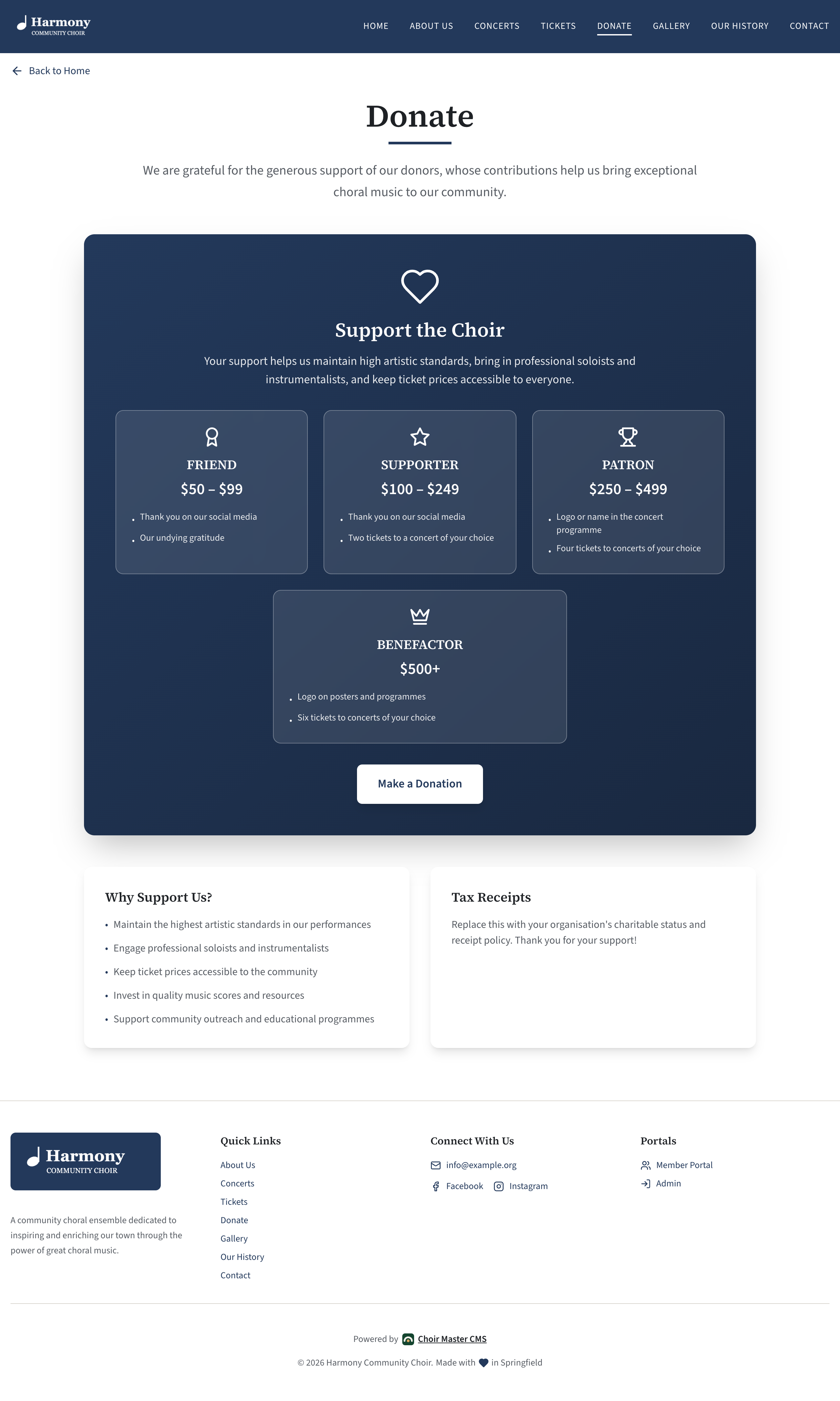
The page shows, from top to bottom, your heading and introduction, the donation box (heading, text, giving levels and button), the card form if it is on, and a pair of boxes with your reasons and your tax text. If you leave out the reasons or the tax text, that box is not shown.
If something goes wrong
| Problem | What to do |
|---|---|
| No button on the page | Fill in both Donate button label and Donate button goes to. |
| The page is not in the menu | Switch Donate page on in Site Settings → Features. |
| A giving level is missing | It has no Name. |
| The amount is cut off | Amount holds up to 40 characters. Shorten it. |