Set up what your receipts say
Before you issue your first receipt, tell the site who is issuing it. This page explains the two kinds of receipt and every box in the settings. Anyone can read the settings, but saving them needs a Site Admin or an Admin. A Manager sees them and is told "Changing these needs a Site Admin or an Admin." See The three kinds of admin.
Official or plain?
Your choir issues one kind of receipt at a time. Which kind is decided by one tick box.
| Plain receipt | Official receipt | |
|---|---|---|
| For | Any choir. A thank-you that confirms what you received. | A registered charity in Canada giving receipts for income tax. |
| Says | "This is not an official receipt for income tax purposes." | Everything the Canada Revenue Agency (CRA) lists for an official donation receipt. |
| Details needed | None, but a name is recommended. | Charity name and address as on file with the CRA, registration number, place of issue, and who signs. |
| Can be emailed | Yes | No. It is printed, signed and handed or posted to the donor. |
If your choir is not a registered charity in Canada, leave the box unticked and issue plain receipts. They are a courteous thank-you and a record of what was received, and say plainly that they are not for income tax.
Open the settings
- In the admin panel, open Donors.
- Choose the Receipts tab.
- Press What your receipts say. The panel opens (press it again to close it).
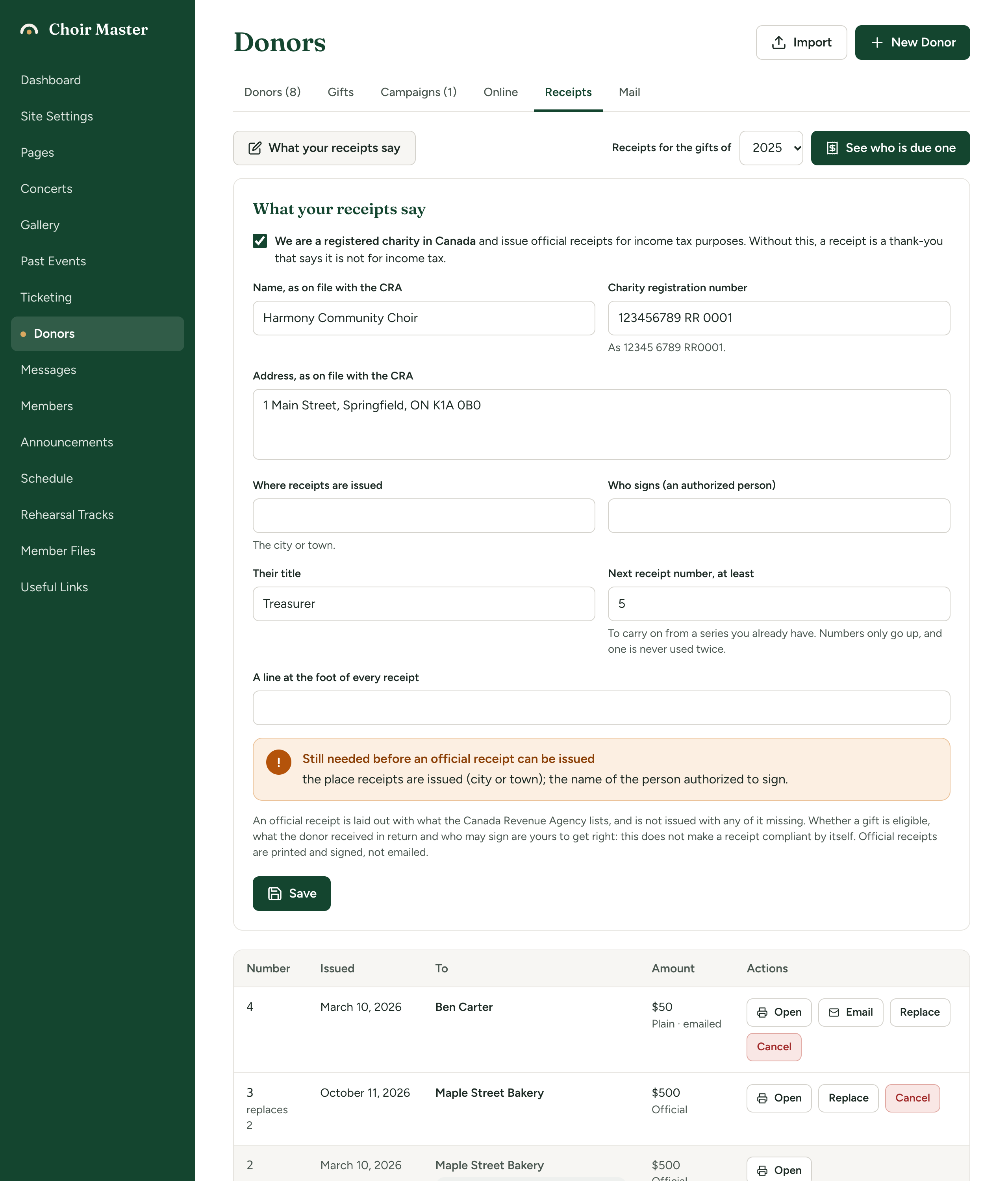
The settings
The box at the top changes the other labels.
| Field | What it is for |
|---|---|
| We are a registered charity in Canada (tick box) | The full wording is "We are a registered charity in Canada and issue official receipts for income tax purposes. Without this, a receipt is a thank-you that says it is not for income tax." Tick it only if that is true. |
| Name on the receipt (plain) or Name, as on file with the CRA (official) | Your choir's name, printed at the top of every receipt. Up to 200 characters. Fill it in for plain receipts too: it is what appears at the top. |
| Charity registration number (official only) | The number the CRA gave you, such as 12345 6789 RR0001. Up to 40 characters. |
| Address (plain) or Address, as on file with the CRA (official) | Your address as it is to be printed. Up to 500 characters, over several lines. |
| Where receipts are issued (official only) | The city or town. Printed as "Place receipt issued". |
| Signed by (plain) or Who signs (an authorized person) (official) | The name printed under the signature line. |
| Their title | For example "Treasurer". |
| Next receipt number, at least | See below. |
| A line at the foot of every receipt | Any wording you like, up to 500 characters. Shown on the receipt and in the email for a plain one. |
Receipt numbers
Every receipt has a number. The first is 1, the next 2, and so on. A number is never used twice, even if a receipt is cancelled.
If you already have a series of receipt numbers from before, for example from paper receipts that reached 412, set Next receipt number, at least to 413. Numbers only go up. If you type a number lower than one already used, the site uses the next free one instead.
Save
-
Press Save. The word "Saved" appears next to the button.
-
For an official receipt, check that there is no yellow box called Still needed before an official receipt can be issued. It lists what is missing, for example "the charity's name, as on file with the CRA; the registration number the CRA issued." The items it can list are:
- the charity's name, as on file with the CRA
- the charity's address, as on file with the CRA
- the registration number the CRA issued
- the place receipts are issued (city or town)
- the name of the person authorized to sign
Official receipts are refused, for one gift or a whole year, until every one is filled in.
What the software does not decide
When you tick the registered-charity box, the panel says:
An official receipt is laid out with what the Canada Revenue Agency lists, and is not issued with any of it missing. Whether a gift is eligible, what the donor received in return and who may sign are yours to get right: this does not make a receipt compliant by itself. Official receipts are printed and signed, not emailed.
Take this at its word. The site lays the receipt out and stops you issuing one with details missing. It does not decide whether your choir is a charity, whether a gift qualifies, what a thank-you gift is worth, or who may sign for you. Check the CRA's guidance at canada.ca/charities-giving, or ask your treasurer or an accountant.
Changing the settings later
A receipt keeps exactly what it said on the day it was issued. Changing your address or signatory affects the receipts you issue next, not the ones already issued. To correct an old receipt, replace it. See Print, email, replace or cancel a receipt.
If something goes wrong
| Message | What to do |
|---|---|
| "Changing these needs a Site Admin or an Admin." | Ask one of them to save the settings. |
| "Could not save" | Try again. |
| "An official receipt cannot be issued until the receipt settings have: ..." | Fill in what it lists, as above. |