Issue receipts
A receipt confirms to a donor what they gave. You can issue one receipt for a donor's gifts, or work through a whole year at once. Any admin can issue receipts. First set up what your receipts say, including whether they are official or plain.
Nothing issues a receipt for you. Even a gift given by card on your Donate page waits until you choose to give it a receipt.
Issue one receipt
- In the admin panel, open Donors and press the donor.
- In their list of gifts, tick the gifts to go on the receipt. A gift that already has a receipt has no tick box and is labelled Receipted.
- A bar appears, saying for example "2 gifts chosen". Press Issue one receipt for it (or Issue one receipt for them). Press Clear to untick everything.
- Answer any question that appears (below).
- A green banner says "Receipt 12 issued." Press Open it to print.
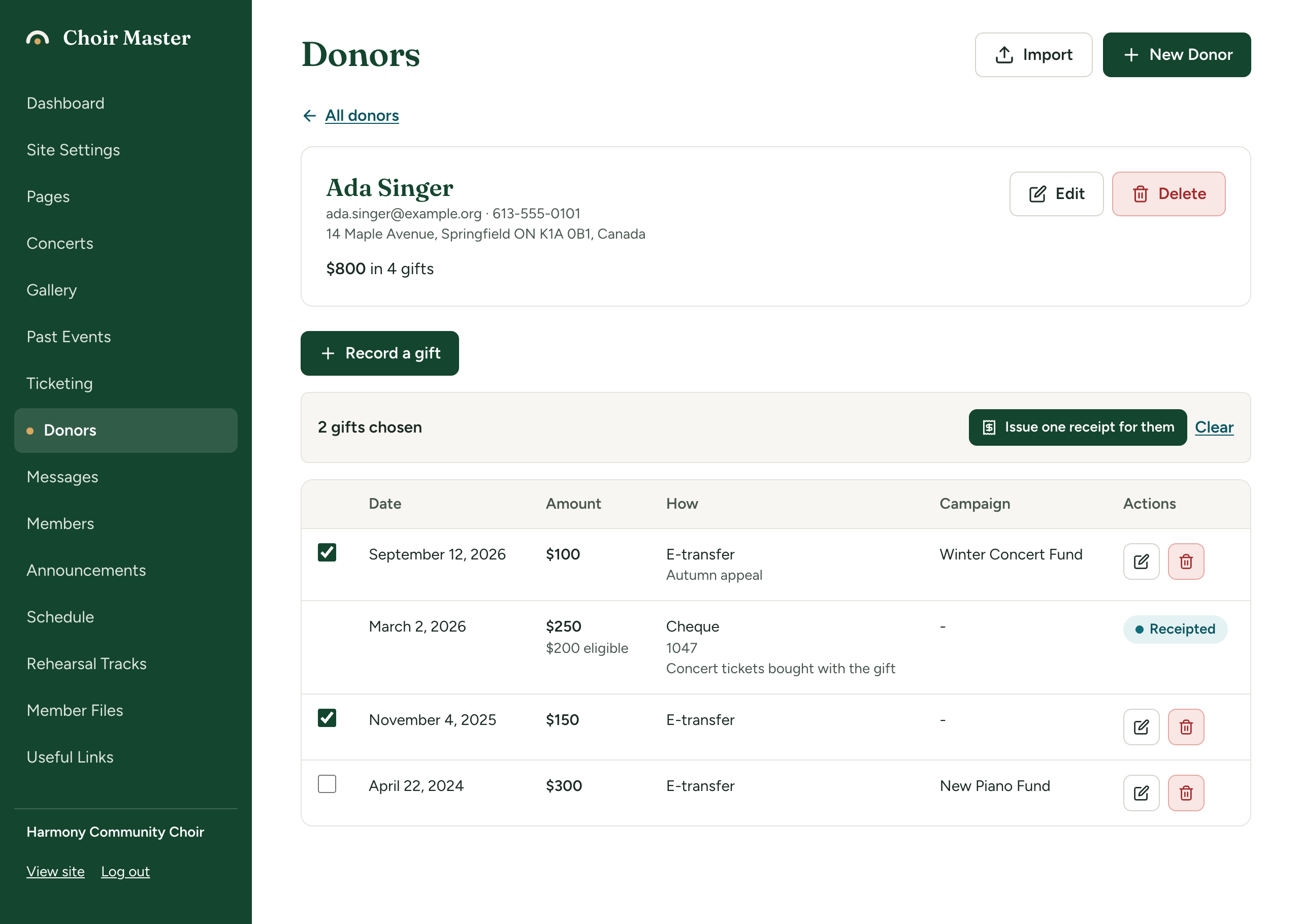
The receipt is dated today, where your choir is. It covers each gift for what you kept of it: if part of a gift was refunded, the receipt is for the rest.
Questions you may be asked
- "What did the donor receive in return?" appears when a ticked gift has an Of which eligible amount lower than the gift, for instance a dinner ticket. "Part of this gift is not eligible for a receipt. What you enter is printed on the receipt." Type what they received, such as "Dinner for two", and press Continue. For an official receipt you must answer; Leave it empty will end with an error saying the receipt has to say what the donor received.
- "Was the gift in kind appraised?" appears when a ticked gift was given In kind. "If it was, enter the name and address of the appraiser. Otherwise leave this empty." Type it and press Continue, or press Leave it empty.
Issue a year's receipts in one go
This is for the usual end-of-year job: one receipt for each donor, covering all their gifts of that year that have no receipt yet.
- Open Donors and choose the Receipts tab.
- Next to Receipts for the gifts of, choose the year. It starts on last year.
- Press See who is due one. A panel called Receipts for 2025 opens. It checks everything and issues nothing: "Nothing has been issued yet."
- Read the list. Each donor is shown with their name, number of gifts and the amount to be receipted, and a label.
- Press Issue 18 receipts, or Cancel to stop. The button cannot be pressed if no one is ready.
- A banner says, for example, "18 receipts issued; 3 left for you to issue from the donor's own page." The new receipts are in the list below.
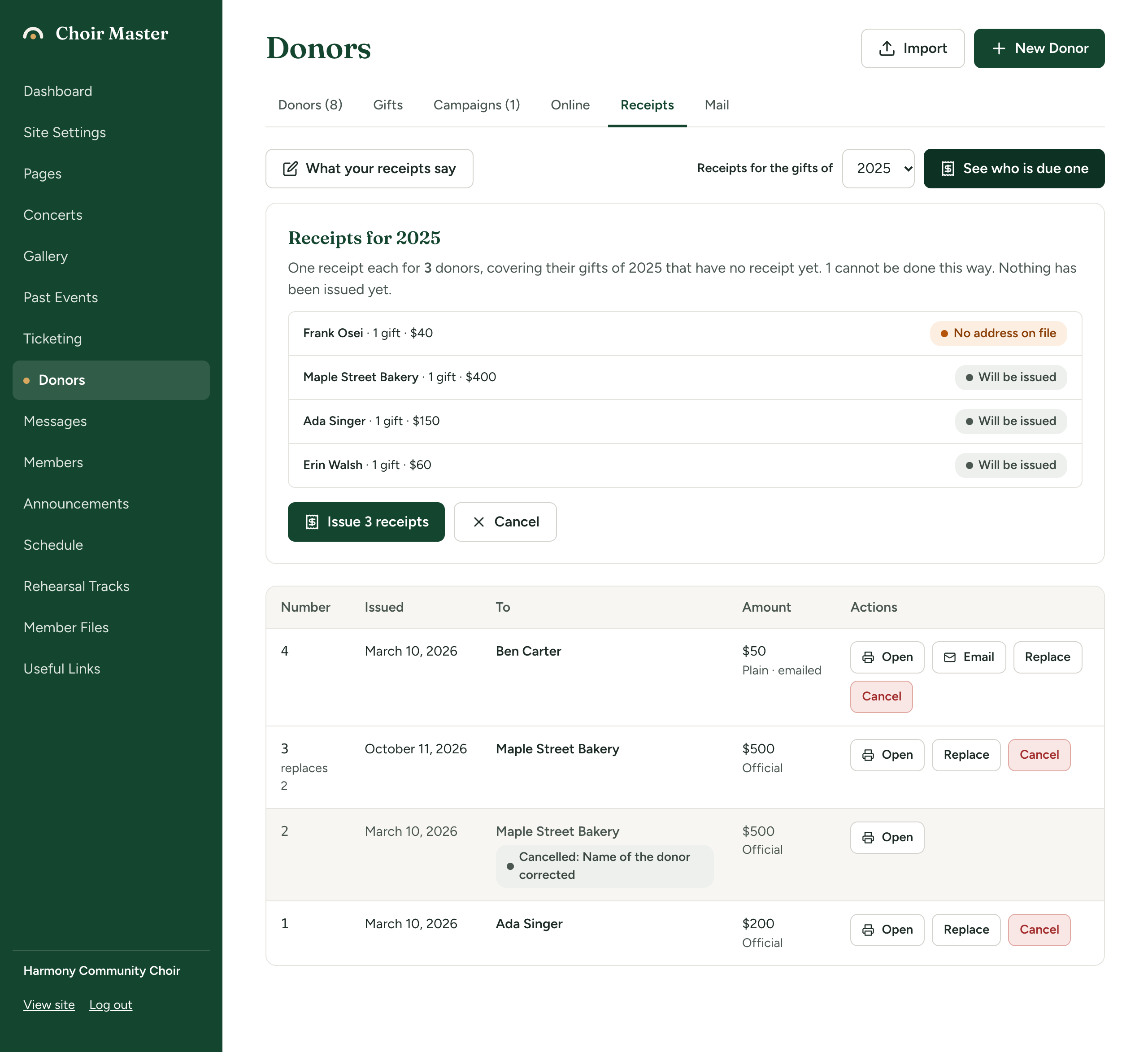
Which gifts are included: those in that year with no receipt, that can have a receipt, and of which something was kept. A gift refunded in full is left out. If every such gift already has a receipt, the list says "Every gift of 2025 that can have a receipt has one."
Donors who cannot be done this way
Some receipts need a person to decide something, so the year's run leaves them for you. They are labelled, and each can still be issued by hand from the donor's page.
| Label | What to do |
|---|---|
| No address on file | Official receipts only. Add the donor's address (and city) to their record, then run the year again or issue by hand. |
| Part of a gift is not eligible: issue this one from the donor's page, saying what they received | Issue it by hand and answer the question about what they received. |
| Has a gift in kind: issue this one from the donor's page | Issue it by hand. |
| Nothing eligible | The donor's gifts have an eligible amount of nothing, so there is nothing to put on a receipt. |
| Another sentence | The reason is in the sentence, for example one of the messages below. |
If your receipt settings are incomplete, nothing is checked: you are told "An official receipt cannot be issued until the receipt settings have: ..." and what is missing. Fix the settings first.
If a receipt cannot be issued
| Message | What to do |
|---|---|
| "Choose at least one gift" | Tick a gift. |
| "One of those gifts already has a receipt" | Reload the page. Another admin may have issued it. |
| "One of those gifts was given a receipt a moment ago. Look again." | Two people issued at the same moment. Reload and check the Receipts tab. |
| "One of those gifts was refunded in full, so there is nothing to give a receipt for" | Untick it. |
| "One of those gifts is marked as not receiptable" | Official only. Edit the gift and tick A receipt can be given for this gift, if that is right. See Record a gift. |
| "Nothing of those gifts is eligible for a receipt" | Official only. Check Of which eligible on the gifts. |
| "An official receipt needs Ada Singer's address. Add it to the donor first." | Official only. Edit the donor and fill in Address and City or town. See Add and look after donors. |
| "Part of this gift is not eligible, so the receipt has to say what the donor received in return. Describe it." | Official only. Issue again and describe what they received. |
| "A gift in kind needs a description of what was given. Add it to the gift first." | Official only. Edit the gift and fill in What was given. |
| "An official receipt cannot be issued until the receipt settings have: ..." | Fill in what is listed in Set up what your receipts say. |
Rules to know
- Numbers are never used again. Receipts are numbered in order, and a number is not reused, not even after the receipt is cancelled.
- A receipt keeps what it said. Once issued, it never changes, even if you later edit the donor, the gifts or your receipt settings.
- A receipted gift is locked. You cannot edit or delete a gift that has a receipt. Cancel the receipt first.
- Refunds are taken into account. A receipt is for what was kept. If a gift is refunded after you have issued a receipt, the receipt is not changed automatically: cancel or replace it. See Print, email, replace or cancel a receipt.
- The date is your choir's day, not the server's.