What buying a ticket looks like
This page shows the public side of ticketing, so you know what your audience sees and can answer their questions. It also explains what is needed before buyers can pay by card.
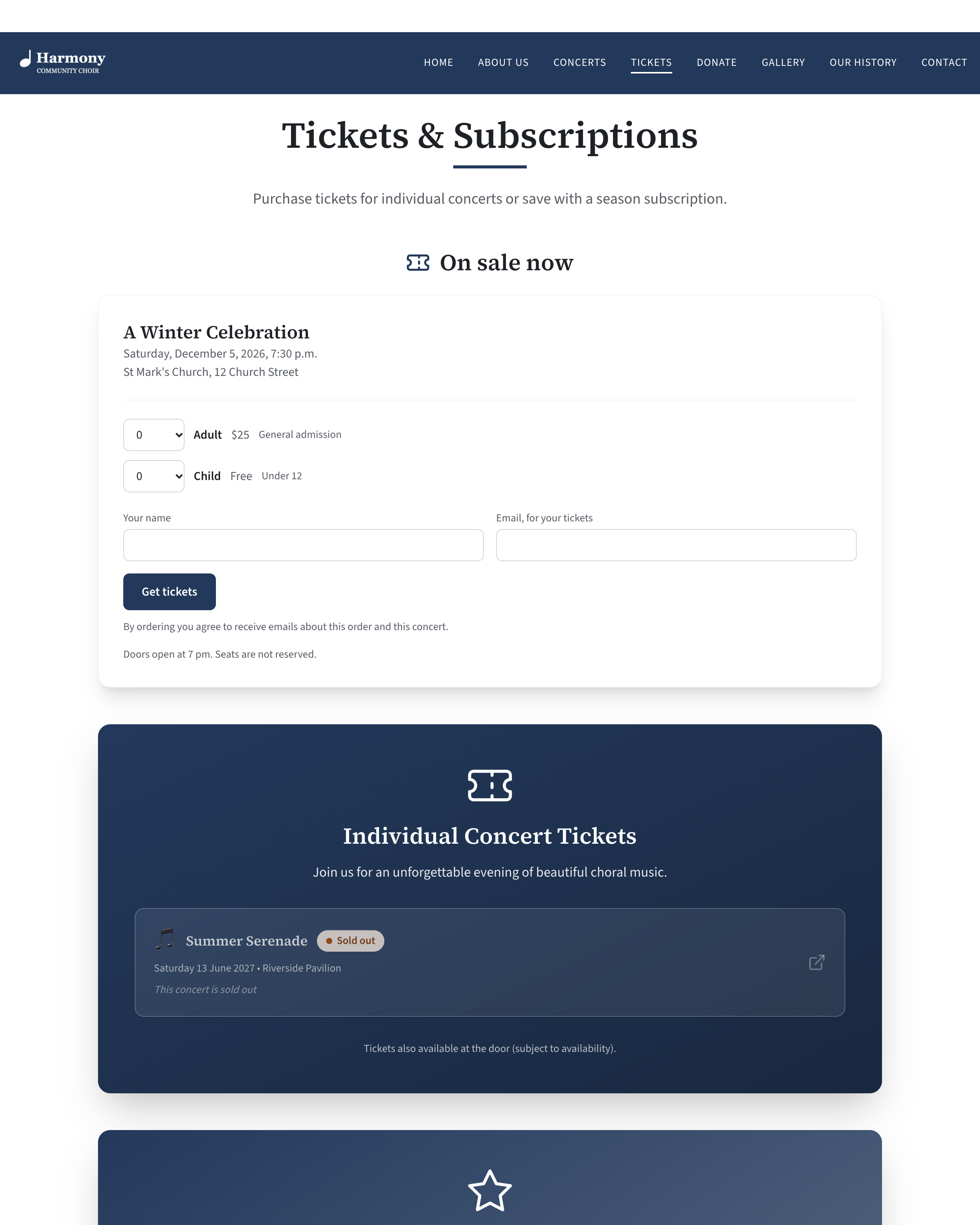
On sale now
When a concert is on sale on your site, the top of your Tickets page has a section headed On sale now. Each concert on sale has a card with its name, date, time and venue, and a Get tickets button. A concert with no places left shows Sold out in place of the button.
What makes a concert appear here is listed in Set up tickets for a concert.
The order form
Pressing Get tickets opens the form.
| Part of the form | What the buyer sees |
|---|---|
| Ticket types | Each type with its price, or "Free", and a list to choose how many. The list never offers more than your Most tickets in one order, or more than are left. |
| Sold out | Shown in place of the quantity when a type has run out. |
| At the door | Shown in place of the quantity when a type has a price but cannot be paid for on the site. See Taking card payments. |
| Your name | Required. |
| Email, for your tickets | Required. The tickets are sent here. |
| The security check | Shown only if your site has a bot check. |
| Pay now by card or Reserve, and pay when I arrive | Shown only when the order has something to pay, your site takes cards, and the concert allows paying on arrival. Otherwise there is no choice to make. |
| The button | Get tickets for a free order, Reserve tickets to pay on arrival, or Pay $50 by card. |
| Beside the button | "$50 to pay when you arrive", or "You pay on a secure page run by Stripe. Your tickets are held for 30 minutes while you do." |
| Under the button | "By ordering you agree to receive emails about this order and this concert." |
| Your notes | The Notes for ticket holders you wrote for the concert. |
What happens next
| The order is | What happens |
|---|---|
| Free | The tickets are issued at once. The buyer is taken to their tickets and emailed the link. |
| Reserved, to pay on arrival | The tickets are issued at once and the places are taken. The buyer's page and email say how much is to pay when they arrive. |
| Paid by card | The buyer is taken to Stripe's payment page. Their places are held, not sold. The tickets are issued, and the email sent, only when Stripe confirms the payment. |
After a free or reserved order the buyer sees, for example, "Thank you, Ada Singer. Your tickets are below." and either "We have emailed you a link to this page." or, if the email could not be sent, "Keep the address of this page: it is the way back to your tickets."
The rules
- Three orders for each email address. One email address can have up to three orders for a concert that are paid, reserved or being paid for. A fourth is refused with "There are already orders for this concert under that email address. Please contact us if you need more tickets." Cancelled and refunded orders do not count. Orders you record yourself with New sale count towards a buyer's three if they have the same email address, but the sales you record are never refused for this reason.
- A priced ticket needs a way to pay. A ticket with a price is offered on the site only if your site takes cards or the concert allows paying on arrival. Free tickets are always offered.
- Card orders hold places for 30 minutes. While a buyer is on the payment page, their tickets are held so nobody else can take them. If the payment is not made, the places go back on sale.
- A card order counts only when Stripe says it was paid. Your site asks Stripe each time. A buyer returning from the payment page does not, by itself, make an order paid.
- Nobody is told how many are left. Buyers see Sold out when a type has run out. The quantity list stops at the number left when that is lower than Most tickets in one order, so a buyer can tell when only a few remain.
If a payment arrives at the very moment its 30 minutes ran out and the places have already gone to someone else, the money is refunded to the card automatically and the order shows as Refunded.
The buyer's "Your tickets" page
Every order has a private page. Its address is in the email the buyer receives, and it is the only way to the tickets.
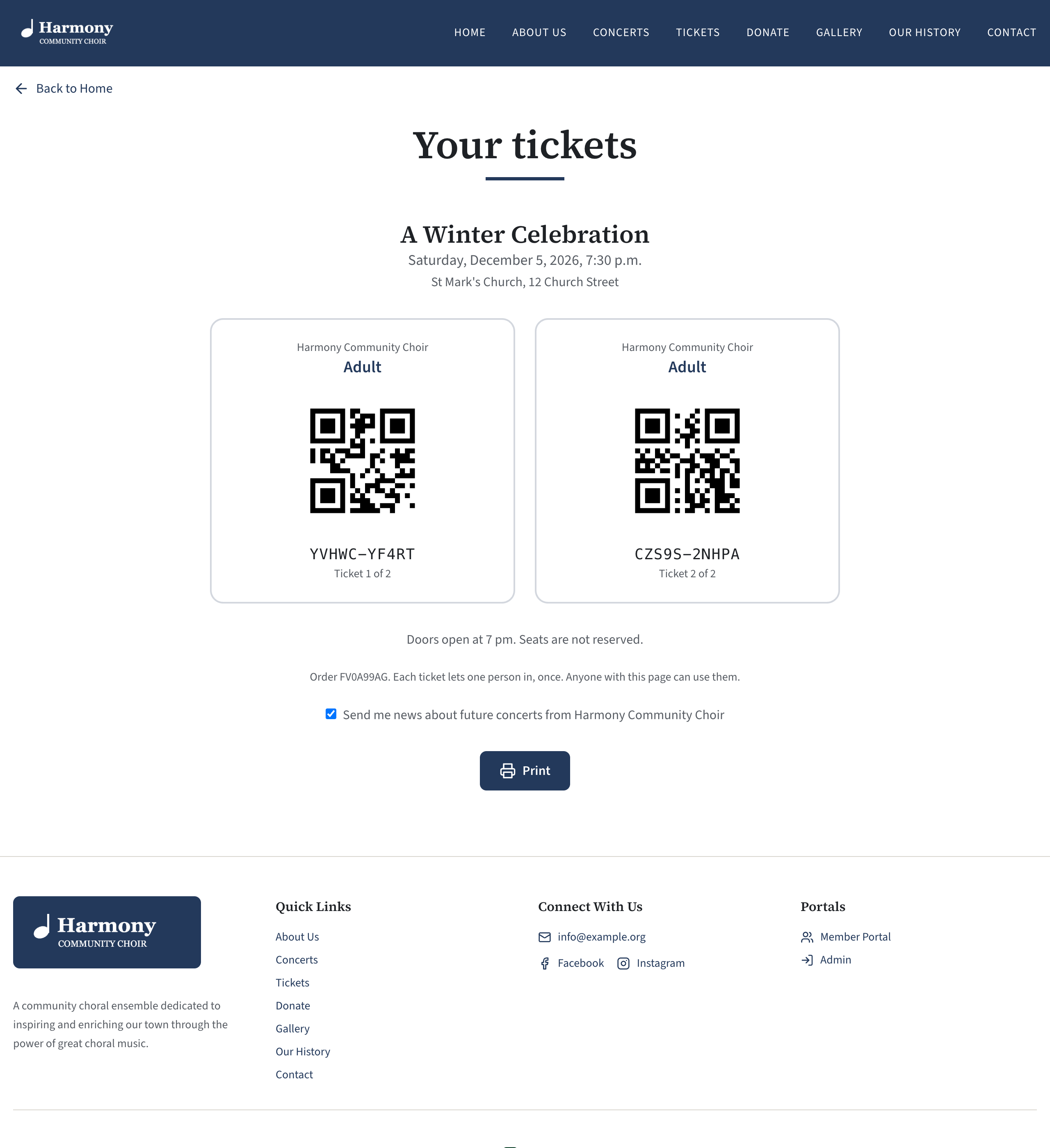
It shows:
- the concert's name, date, time and venue;
- To pay when you arrive and the amount, for a reserved order;
- one card for each ticket, with your choir's name, the ticket type, a QR code, the ticket's code, and "Ticket 1 of 2". A ticket that has been used at the door says "already used";
- your notes for ticket holders;
- "Order" and its reference, then "Each ticket lets one person in, once. Anyone with this page can use them.";
- a tick box, Send me news about future concerts from followed by your choir's name. Unticking it stops your news and promotion reaching that address. It never stops their tickets or messages about a concert they hold tickets for. See Email a concert's ticket holders;
- a Print button;
- for some orders, I can't come: cancel these tickets. See What a buyer can cancel themselves.
The buyer can show the page on their phone at the door or print it.
While a card payment is not finished
A buyer who leaves the payment page without paying lands on a page titled Your order. It says their tickets are being held but have not been paid for yet, and that "They go back on sale if payment is not made within 30 minutes of ordering." It has a button to pay by card and Cancel this order.
After an order is cancelled
The page says "This order was cancelled." or "This order was refunded.", and "These tickets cannot be used." The codes are no longer shown.
The confirmation email
The buyer is emailed as soon as their tickets are issued. The subject is, for example, "Your 2 tickets for Winter Concert".
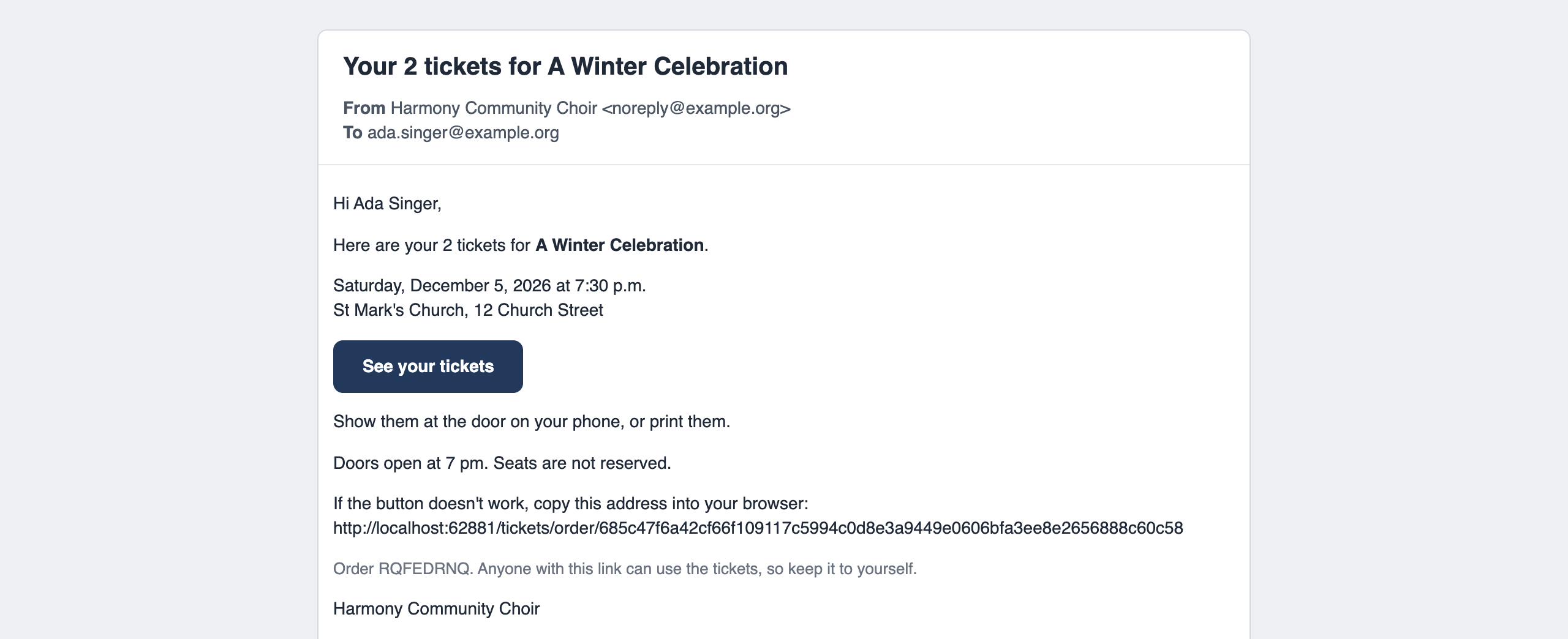
It contains:
- the concert, its date and time, and the venue;
- a See your tickets button that opens the buyer's page, and the same address written out;
- "Show them at the door on your phone, or print them.";
- "Still to pay when you arrive:" and the amount, for a reserved order;
- your notes for ticket holders;
- the order reference, and "Anyone with this link can use the tickets, so keep it to yourself.";
- your sign-off. See The sign-off and footer of your emails.
If a buyer loses the email, send it again from the order. See Find an order and download the list.
Taking card payments
Messages a buyer may see
| Message | Why |
|---|---|
| "Choose how many tickets you would like." | No quantity was chosen. |
| "One order can have up to 10 tickets." | The order is over your Most tickets in one order. |
| "Please complete the security check." | The bot check was not completed. |
| "Tickets for this concert are not on sale at the moment" | Sales closed, or the concert's day ended, while the form was open. |
| "Sorry, there are not that many Adult tickets left" | That type's limit would be passed. |
| "Sorry, there are not that many places left" | The concert's Places would be passed. |
| "Adult tickets are sold at the door" | That type cannot be paid for on the site. |
| "There are already orders for this concert under that email address. Please contact us if you need more tickets." | The limit of three orders for each email address. |
| "Payment could not be started just now. Nothing was charged; please try again in a minute." | Stripe's payment page could not be opened. The order was cancelled and its places released. |
| "There are no tickets at this address. Check the link in your email." | The address of the tickets page is wrong or incomplete. |