Add ticket types and prices
A ticket type is one kind of ticket at one price: Adult, Student, Family. Every concert needs at least one before anything can be sold or given out. Any admin can add them.
Add a ticket type
- In the admin panel, open Ticketing and press the concert.
- On the Tickets tab, press Add a ticket.
- Fill in the fields below.
- Press Save.
Add one for each price.
| Field | What it is for | If left empty |
|---|---|---|
| Name | What buyers see, such as "Adult". Required, up to 80 characters. | Cannot be empty |
| Price | The price of one ticket, as a number such as 25 or 12.50, in your site's currency. | Free |
| Limit | The most of this type there can be. A whole number of 1 or more. | No limit for this type |
| On sale | Ticked: the type can be sold. Unticked: nobody can be sold one, on the site or by you. | Ticked to begin with |
| Offered on the site (off: only sold by the choir) | Ticked: visitors can order it on your Tickets page. Unticked: only you can sell it, from New sale. | Ticked to begin with |
A price of 0 also means free.
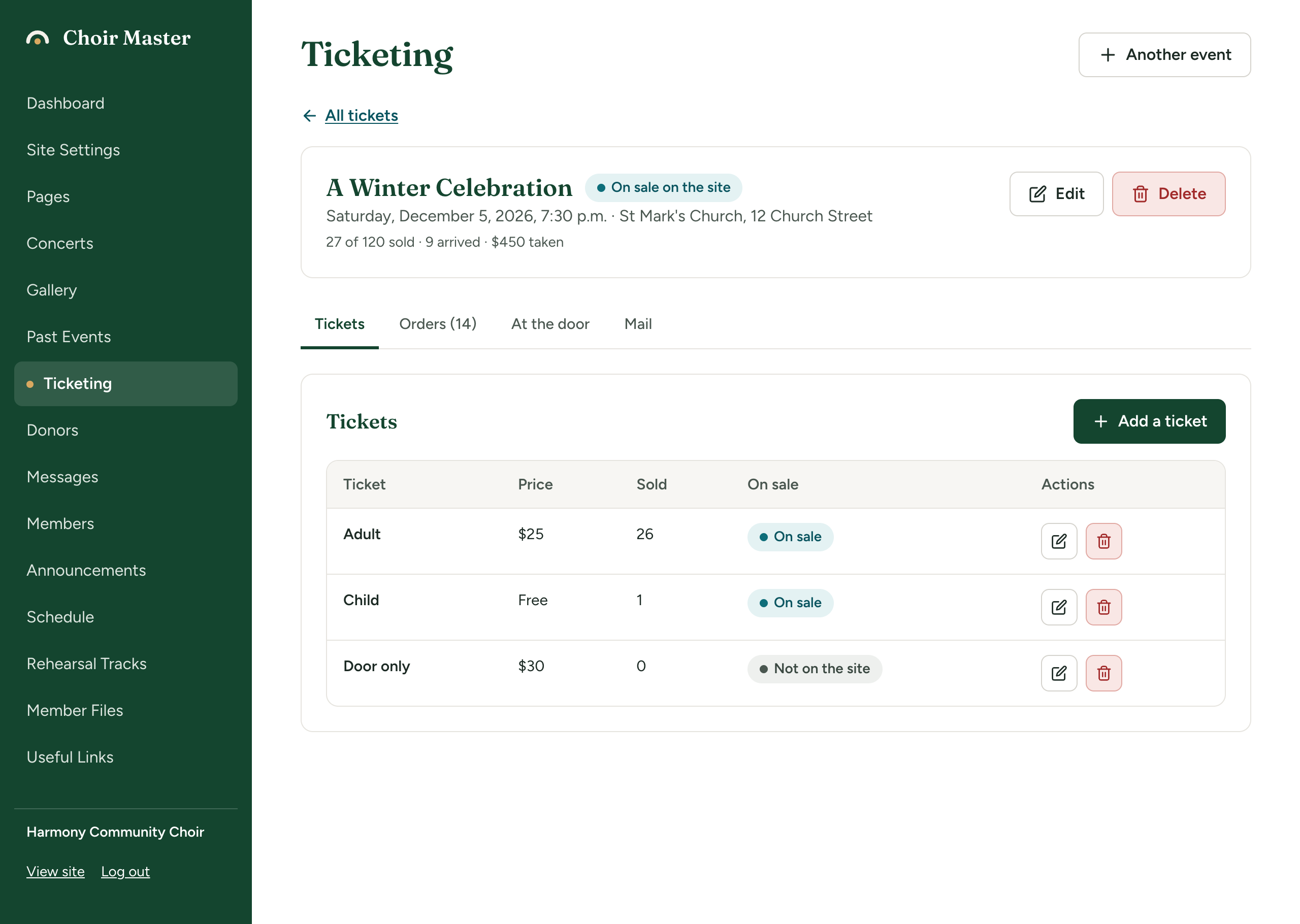
Read the table
| Column | What it shows |
|---|---|
| Ticket | The name. |
| Price | The price, or "Free". |
| Sold | How many have been sold, and "of" the limit if there is one. |
| On sale | On sale: sold on the site and by you. Not on the site: only sold by you. Off sale: not sold at all. |
| Actions | A pencil to edit and a bin to delete. |
How the limits work
There are two limits and both are checked on every order.
- Limit on a ticket type: the most of that type.
- Places on the concert: the most tickets of every type together. You set this when you set up the concert's tickets.
For example, with 200 places and a limit of 40 on Student tickets, the 41st student is refused, and so is the 201st ticket of any type.
Neither limit can be set below what is already taken. "Taken" counts tickets sold and tickets being paid for by card at that moment. If you try, you are told, for example, "38 of these are already taken, so the limit cannot be lower than that."
Buyers are not told a number of tickets left. They see Sold out when a type has run out. Until then, the list of quantities on the order form stops at the number that is left when that is lower than Most tickets in one order, so a buyer can tell when only a few remain.
Change or remove a type
- Change it. Press the pencil, change what you need, press Save. A new price applies to orders made from then on. Tickets already sold keep the price they were sold at.
- Stop selling it. Edit it and untick On sale.
- Delete it. Press the bin, then Delete. This works only for a type that has never been issued.
A type that has been issued, even on an order since cancelled, cannot be deleted. You are told "Tickets of this kind have been issued, so it cannot be deleted. Take it off sale instead." Untick On sale.
Examples
| Name | Price | Limit | On sale | Offered on the site | Why |
|---|---|---|---|---|---|
| Adult | 25 | (empty) | Ticked | Ticked | The ordinary ticket. |
| Student | 15 | 40 | Ticked | Ticked | A cheaper ticket, with only 40 available. |
| Child (under 12) | (empty) | (empty) | Ticked | Ticked | A free ticket. Buyers still order one, so you know how many children are coming. |
| Door only | 30 | (empty) | Ticked | Unticked | A price you only sell yourself, at the door. It is not on the Tickets page. |
Whether a priced ticket can be ordered on the site
A free ticket can always be ordered on your site. A ticket with a price can be ordered there only if at least one of these is true:
- your site takes card payments, or
- the concert allows people to reserve and pay when they arrive.
Otherwise the order form shows the type with At the door in place of a quantity. See What buying a ticket looks like.
If something goes wrong
| Message | What to do |
|---|---|
| "The ticket needs a name, such as Adult or Student" | Fill in Name. |
| "Enter the price as a number, such as 25 or 12.50" | Type the price with no currency sign and at most two decimal places. |
| "The price is not an amount the site can read" | The price is too large. The most is 1,000,000.00. |
| "The limit must be a whole number, or left empty for none" | Type a whole number in Limit, or clear it. |