Let the writing assistant draft your words
The writing assistant is a helper in the guided setup that writes a first draft of a short piece of text for your site, or tidies up what you have typed. It is for the admin who is setting up a new site and is not sure what to say. It uses an artificial intelligence service, and what it writes is only ever a suggestion: you decide what is kept.
Where it is, and where it is not
The assistant exists only in the guided setup, under four boxes:
| Step | Box |
|---|---|
| 3. Words | Tagline |
| 3. Words | Welcome line |
| 3. Words | About the choir |
| 4. Contact | Introduction to the contact section |
It is not in Site Settings, Pages, Announcements or anywhere else in the admin panel. To use it after your site is set up, open the setup again by typing your site's address followed by /admin/setup, go to step 3 or 4, and save the step when you are happy.
If there are no assistant buttons under those boxes, your site does not have the assistant. Type the words yourself.
Have it write a draft
- On step 1 of the setup, fill in at least your Choir name. The more of that step you fill in, the more the assistant has to go on.
- On step 3, type a few facts into Anything the writing assistant should know? This is optional, holds up to 600 characters, and is not shown on your site. For example: what you sing, when you rehearse, whether singers need an audition.
- Under an empty box, press Write a draft for me. The button says Writing... while it works, which takes a few seconds.
- Read the draft. Change anything you like by typing in the box.
- Press Save and continue at the bottom of the step to keep it.
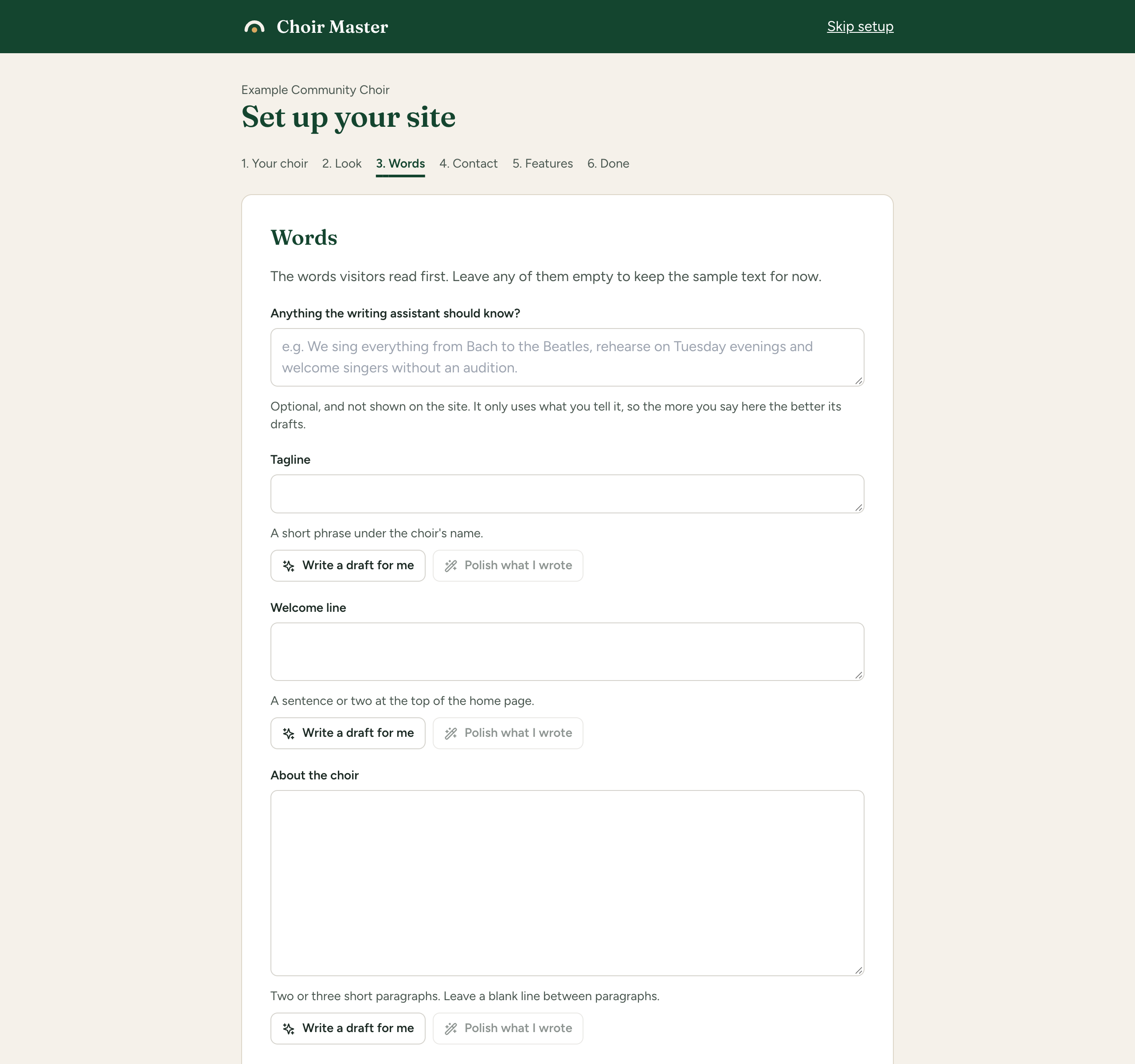
If the box already has words in it, the first button reads Write a new draft instead. Pressing it replaces what is in the box with a fresh draft.
Have it polish what you wrote
- Type your own words into the box.
- Press Polish what I wrote. The button says Polishing... while it works.
- Read the result and change anything you like.
Polishing keeps your meaning, your facts and roughly your length, and makes the text clearer and free of mistakes. It keeps the language you wrote in and does not translate. Polish what I wrote cannot be pressed while the box is empty.
Go back to what was there
After the assistant has written into a box, an Undo link appears beside the buttons. Press it to put back exactly what the box held before. Undo goes away as soon as you type in the box, and it only goes back one step.
Nothing the assistant writes is saved by itself. A draft is only words in a box until you press Save and continue on that step. If you press Skip this step or Skip setup, or close the page, the draft is not saved. Words in a box stay there while you move between steps with Back, but only Save and continue keeps them.
What the assistant is told
Each time you press a button, the assistant is sent:
- your choir's name;
- the kind of choir, unless it is Something else or not chosen;
- the city or town, the province, state or county, and the country;
- the year founded, if it is four digits;
- whatever you typed in Anything the writing assistant should know?;
- which piece of text is wanted and how long it may be;
- the language of your site, when it is writing a new draft;
- the words in the box, when it is polishing.
It is sent nothing else. It is not given your members, your donors, your concerts, your email address or phone number, or anything else from your site.
It is instructed to use only the facts it is given and never to invent names, dates, numbers, awards, repertoire, venues or history. It will not say who may join, whether there are auditions, when you rehearse or what you sing unless you told it. That is why the notes box matters: the more you say there, the better the draft. All the same, read every draft before you keep it.
A new draft is written in the language your site is set to, with that region's spelling. A site's language is its Locale for dates and prices in Site Settings, in the Choir section. See Your choir's name, place, currency and time zone.
The text listed above is sent to Anthropic, the company whose service does the writing. Do not put anything private in the notes box.
The daily limit
Each site can ask the assistant for a limited number of pieces of writing a day: 30 unless whoever runs the site has set a different number. Every press of Write a draft for me, Write a new draft or Polish what I wrote counts as one, including a press that ends in an error after the request was sent. The count starts again each day at midnight UTC.
When the limit is reached, the buttons can no longer be pressed and Today's limit for the writing assistant has been reached. is shown beside them. Type the words yourself, or come back tomorrow.
Messages you may see
The assistant only ever shows one of these fixed messages, in red under the box.
| Message | What it means | What to do |
|---|---|---|
| Fill in the choir's name first, so there is something to write about. | Nothing was filled in on step 1, so there are no facts to write from. | Go Back to step 1 and fill in the choir's name. |
| Write something first, then ask for it to be polished. | The box is empty. | Type something, or use Write a draft for me. |
| That is too long to polish in one go. Shorten it first. | The text is over 4,000 characters. | Shorten it. |
| Today's limit for the writing assistant has been reached. It can be used again tomorrow. | The site has used its allowance for the day. | Come back tomorrow, or write it yourself. |
| The writing assistant is busy. Try again in a minute. | The service is handling too many requests. | Wait a minute and press the button again. |
| The writing assistant could not be reached. Try again in a minute. | The request did not get through, or took longer than 30 seconds. | Wait a minute and try again. |
| The writing assistant could not write that just now. Try again in a minute. | The service returned an error. | Wait a minute and try again. |
| The writing assistant came back with nothing. Try again. | The answer was empty. | Press the button again. |
| The writing assistant declined to write that. Try describing the choir differently. | The service would not write from what it was given. | Reword the notes box and try again. |
| The writing assistant is not set up correctly on this site. | The service refused the site's key. | Tell whoever runs the site. On a site we host, see Get help. |
| The writing assistant is not set up on this site. | The site has no assistant. | Write the text yourself. |
| The assistant does not write that. or Ask the assistant to generate or to polish. | Something unexpected was asked for. You should not see these in normal use. | Reload the page and try again. |
A draft that comes back longer than the box allows is cut at the end of the last whole sentence that fits.