Beta versions and update channels
A new version is usually tried out before it is released to everyone. The update channel decides whether your site is offered only finished versions or also those still being tested. Most sites should stay on the default, Stable. This page is for whoever runs the server.
The three channels
From the most settled to the least:
| Channel | What your site is offered | Example version numbers |
|---|---|---|
stable | Finished releases only. | 1.7.0 |
beta | Betas, and finished releases. | 1.7.0-beta.1, 1.7.0-rc.1 |
dev | Development builds, betas and finished releases. | 1.7.0-dev.1 |
A version's own number says which channel it belongs to: a pre-release part starting with dev is a development build, any other pre-release part is a beta, and a version without one is stable. A published version is never rewritten. If a release turns out to be bad, it is withdrawn so no more sites are offered it, and a new version replaces it.
Choose a channel
Set UPDATE_CHANNEL in the site's settings and restart the server (on Cloudflare, redeploy). See Give the server its settings.
UPDATE_CHANNEL | What happens |
|---|---|
| not set (the default) | The site does not ask for a channel. The release server uses the channel your licence is on, which is stable unless the publisher changed it. The Updates page shows the channel the server went by. |
stable | The site asks for stable releases, even if its licence allows more. |
beta | The site asks for beta. Any site may do this. |
dev | The site asks for development builds. This works only if the publisher has put your licence on the dev channel. Otherwise the site is treated as asking for beta. |
| anything else | Treated as stable, with the start-up warning UPDATE_CHANNEL is "...": use stable, beta or dev. Using stable. |
A site may always ask for something more settled than its licence allows. It cannot give itself development builds: the release server decides, and it also refuses to hand a development build's download to a licence that is not on the dev channel. Which channel a licence is on is the publisher's choice, which you arrange by writing to support@choirmastercms.com.
In full, for a site that asks and a licence on a channel:
| Licence is on | Site asks for nothing | Asks stable | Asks beta | Asks dev |
|---|---|---|---|---|
stable | stable | stable | beta | beta |
beta | beta | stable | beta | beta |
dev | dev | stable | beta | dev |
What the Updates page shows
The panel at the top shows Update channel: Stable, Beta or Development. That is the channel the release server went by at the last check. Before the first check it shows the channel the site asked for.
If the site asked for more than it was given, a blue note says so. For UPDATE_CHANNEL=dev on a licence that is not on the dev channel it reads:
This site asks for development builds (UPDATE_CHANNEL=dev), but its licence key is not on the development channel, so it is on the beta channel.
For other cases it reads "This site asks for the X channel but is on the Y channel."
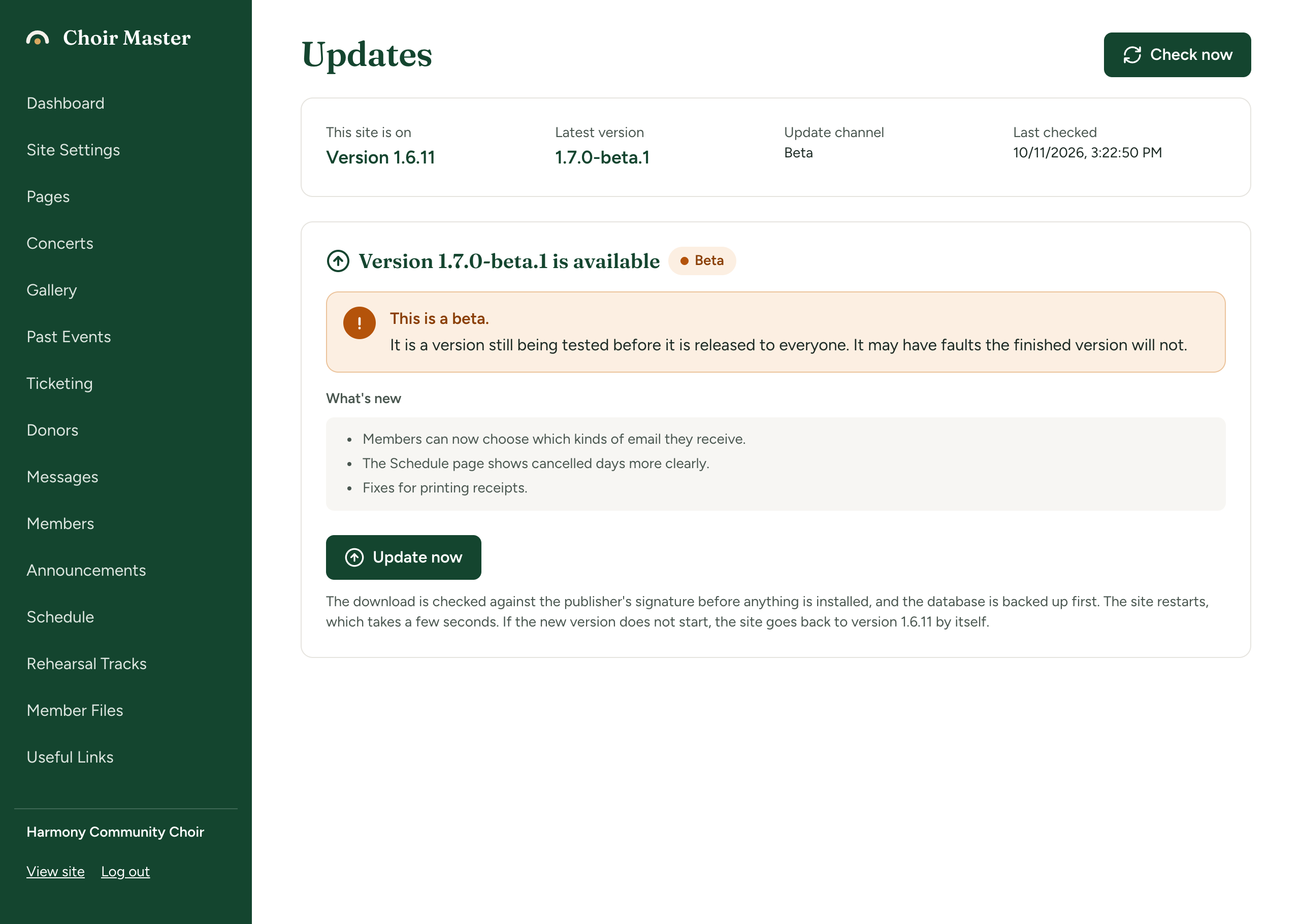
A beta or a development build, offered or running
A version that is a beta or development build is marked with a label and an amber warning, both when it is on offer and while the site is running it.
| Kind | Label | Warning title | Warning text |
|---|---|---|---|
| Beta | Beta | This is a beta. | It is a version still being tested before it is released to everyone. It may have faults the finished version will not. |
| Development | Development build | This is a development build. | It is made for testing work that is not finished, and may not have been tried anywhere else. Do not install it on a site people rely on. |
When a beta is on offer the label and warning appear next to Version X is available. When your site is running one, the warning is at the top of the page and the label is under This site is on. Installing a beta works like installing any release, and its signature is checked in the same way.
Never install a development build on a site that people rely on.
Which version counts as newer
Versions are compared the usual way, on every channel:
- A finished version is newer than all of its pre-releases.
1.7.0is newer than1.7.0-beta.3and1.7.0-dev.9. A site on a beta is offered1.7.0as soon as it is published, and moves off the beta onto it. - Between pre-releases of the same version, the names are compared alphabetically, so every
1.7.0-devbuild counts as newer than every1.7.0-beta. A site on1.7.0-dev.3is not moved to1.7.0-beta.1. It stays where it is until a later dev build, or1.7.0itself.
Development builds are cut for the publisher's own test sites, so most sites will never see this.
Go back to stable
- Set
UPDATE_CHANNEL=stable, or remove the setting, and restart. - The site is offered only finished releases from then on. It stays on the beta it is running until a finished version that is newer than it appears. If you are on
1.7.0-beta.1, the next stable release that is offered is1.7.0or later.
There is no downgrade. To go back to an older finished version while you wait, install it by hand (Update by hand) and, if the site had downloaded the beta itself, delete DATA_DIR/releases first so the installed code runs. See How updates work.